Let's (not) get into semantics!
Semantic html and me
Why semantic html?
Semantic html can be tricky to fully grasp — I still don't get the difference between article and section — however, it can save a lot of confusion, frustration, and time.
Even if you were (for some reason) against using semantic html and only used div and span all the time, you'd end up coming up with your own labelling system for your tags using class and id attributes — especially as you got into CSS and were trying to style things. You could do all that work, or you could just use a meaning-filled tagging system that an influential organisation has already made and that is already widely used by developers.
Putting my writing into html
Let's look at an example: my first blog post. Here is the skeleton for the page's body done in non-semantic and semantic html:
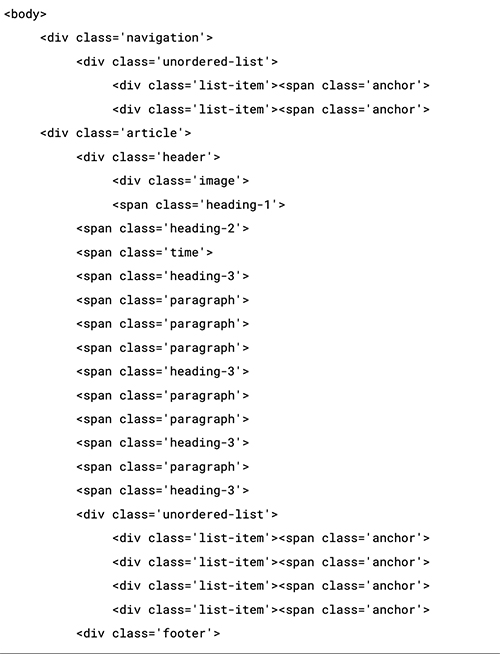
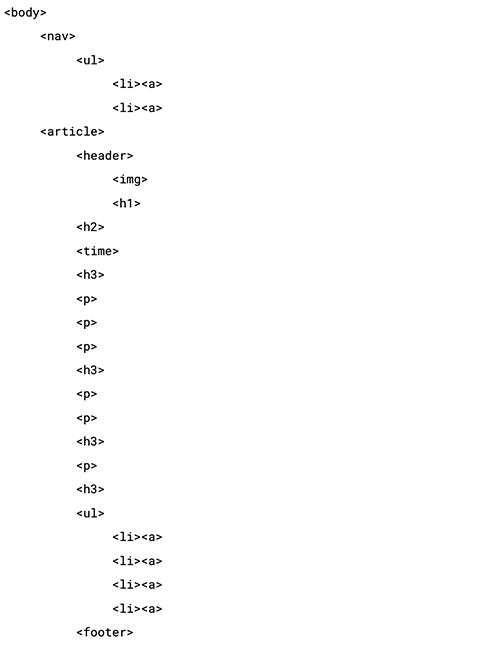
It's clear that the second one is much easier to scan, not to mention quicker to type! Because the text is simpler, it's easier to spot errors, but it's also easier to not make errors in the first place. For the sake of my own sanity, in case I ever needed to go back and look at this html code again, and in order to make styling in CSS easier, I used semantic markup for the actual page.
The look of my blog post
Given that my blog content is mostly text, readability and scannability were my highest priority when it came to styling my blog page. I wanted to create good contrast without being harsh on the eyes: so I went with an off-white for the background paired with an off-black for the text and nav elements.
The biggest challenge was the typography because it was the most important design element to get right. I chose Roboto Serif Regular for the body paired with Roboto SemiBold for the headings, because of their crisp but approachable look and their readability.